
You can try AI room design free on your iPhone with Room Redo. Take one photo of your own room, pick a style, and the app redesigns that same room in the new look. Your first redesign is free: the full redesign, in any style, with a small Room Redo watermark, and no account to make.
At a glance
- Price
- First redesign free
- Device
- iPhone
- Account
- None needed
- Best photo
- Daylight, from the doorway
- Next step
- Copy the palette, keep your layout
The free redesign is the easy part. What makes it useful is the photo you start from and what you do with the picture afterwards. Below is how to get both right, shown in two real rooms.
How to photograph a room for an AI redesign
Shoot in daylight, from the doorway or a corner, with the phone held level at chest height. Clear away the mess, but leave the furniture. That covers most rooms. Here's the detail.
| What | Do this | Why |
|---|---|---|
| Light | Shoot by day with the curtains open | Daylight shows the real color of your walls and floor. One bulb at night turns everything yellow and hides the corners |
| Where to stand | In the doorway, or the corner farthest from the window | You get two walls, the floor and the window in one frame |
| Phone height | Chest height, screen straight up, no tilt | Tilting makes the walls lean, so the room looks smaller and odder than it is |
| Upright or sideways | Upright for a long, narrow room. Sideways for a wide one | Match the shape of the room so nothing important gets cropped |
| Clutter | Pick up laundry, boxes and bags | Mess pulls the eye away from the room itself |
| People | Keep them out of the frame | A room with nobody in it reads clearly. Room Redo turns away photos with people in them |
Take three shots from slightly different spots, then keep the one where you can see the floor all the way to the far wall. Our rule of thumb: when the photo cuts the floor off, any room looks cramped in it.
Don't bother staging. You're not selling the house. A bare, scuffed room is a perfectly good starting point, as the spare room in the next section shows.
If it's light out where you are, take that doorway shot now. The app is free to download, and your first redesign costs nothing.
How do you choose a style for your room?
Start from the room you have, not the photo you saved. Its size, its light and the furniture you're keeping narrow the choice fast.
| If your room is | Lean toward | Because |
|---|---|---|
| Small or narrow | Scandinavian or Japandi | Pale wood, light walls and furniture on legs keep the floor in view |
| Dim, with one small window | Light walls with warm wood (Scandinavian, Organic Modern) | Pale surfaces bounce what light there is |
| Bright and a decent size | Mid-Century Modern, Art Deco, darker walls | With good light, a deep color feels cozy |
| Full of dark wood you're keeping | Mid-Century Modern or English Country | Walnut and warm tones are already part of those looks |
| Full of white flat-pack you're keeping | Scandinavian or Modern Minimalist | Your pieces already match the palette |
The small-room rule is the one people break most. Chunky furniture that sits flat on the floor blocks the eye. Designer Tim Clarke likes open pieces for exactly this reason: "You can see beyond them so it doesn't stop your eye," he told Sunset.
Then decide what you're after. A real interior style (Room Redo calls these Serious styles) is for when you're about to buy paint or a bed. A big what-if (the app's Wild ideas) is for when you're not sure what the room should even be. Wild ideas rebuild the room around the idea, so expect bigger changes.
Here's that advice in a real room: a long, thin spare room with scuffed white walls, a bare bulb, and one window at the far end over a radiator. Tap a style, then drag the divider to compare.
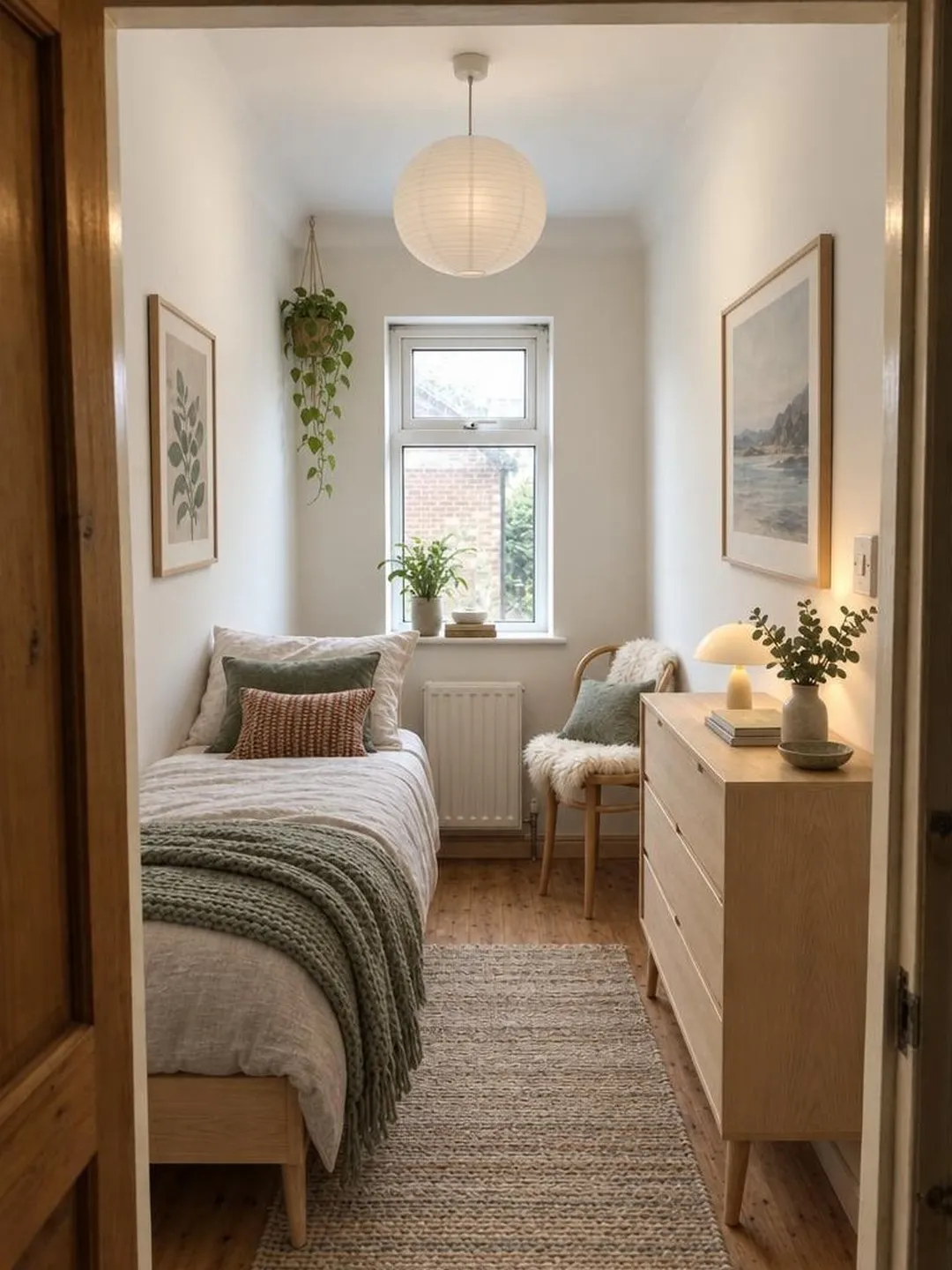
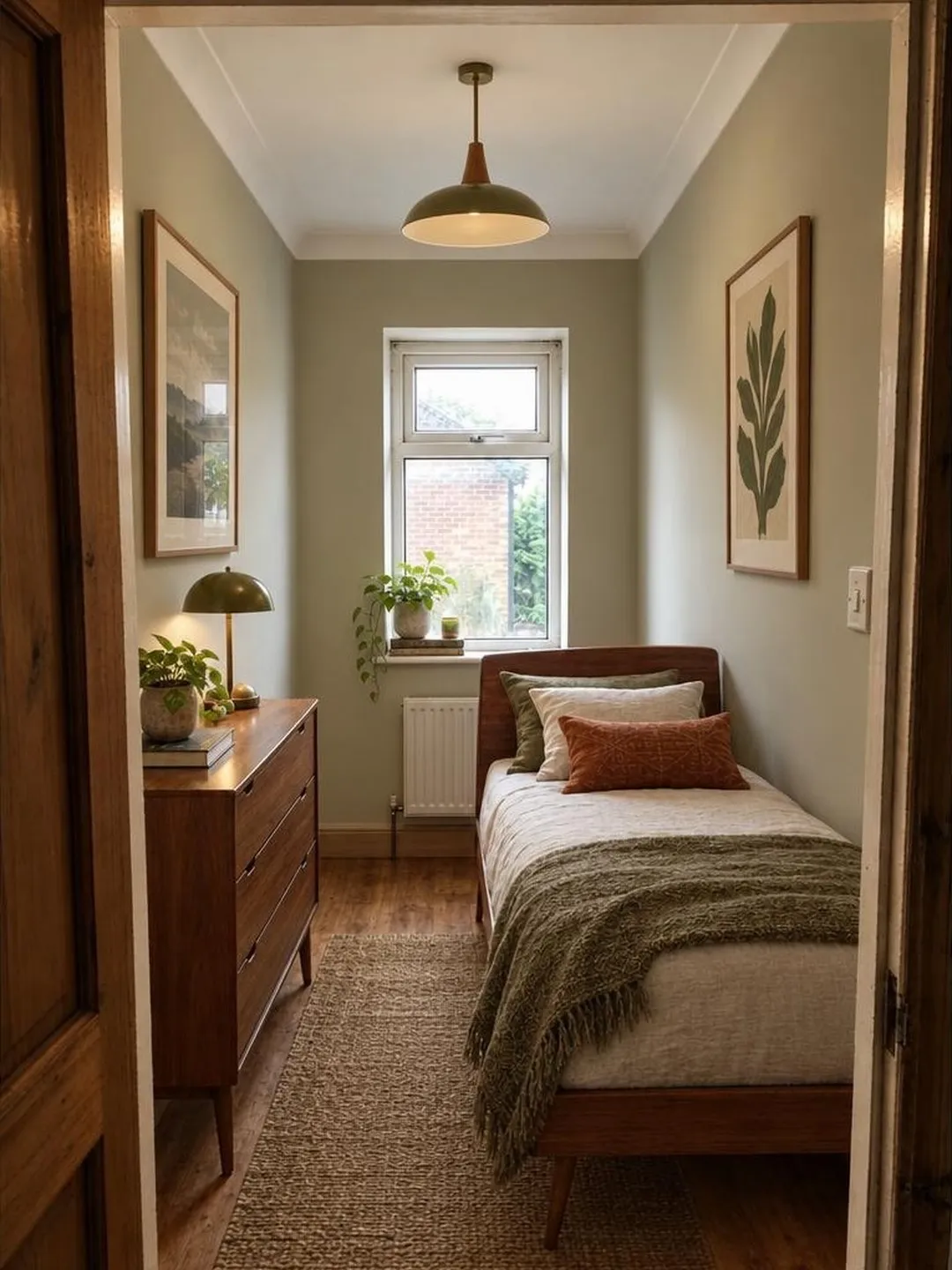
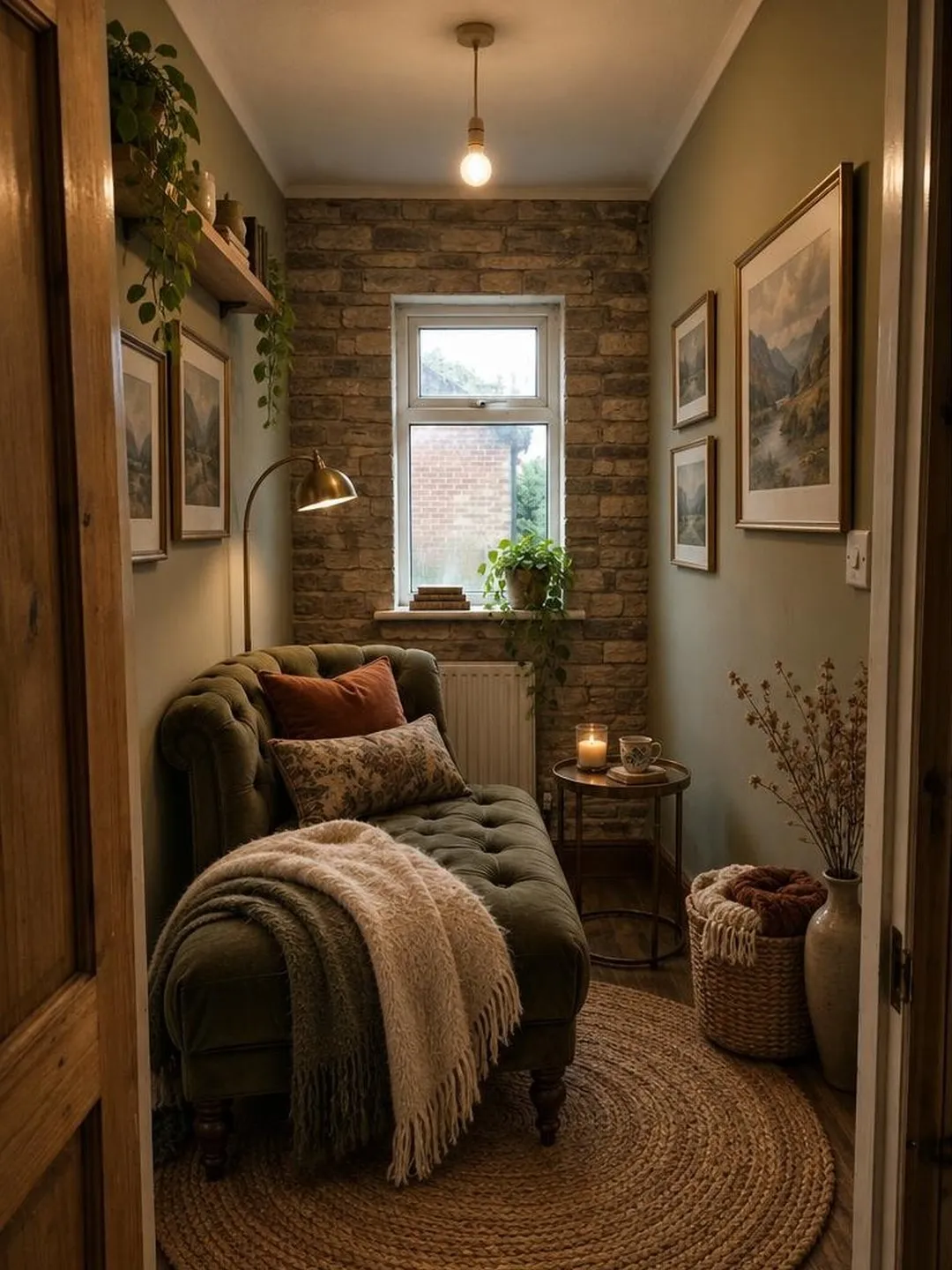
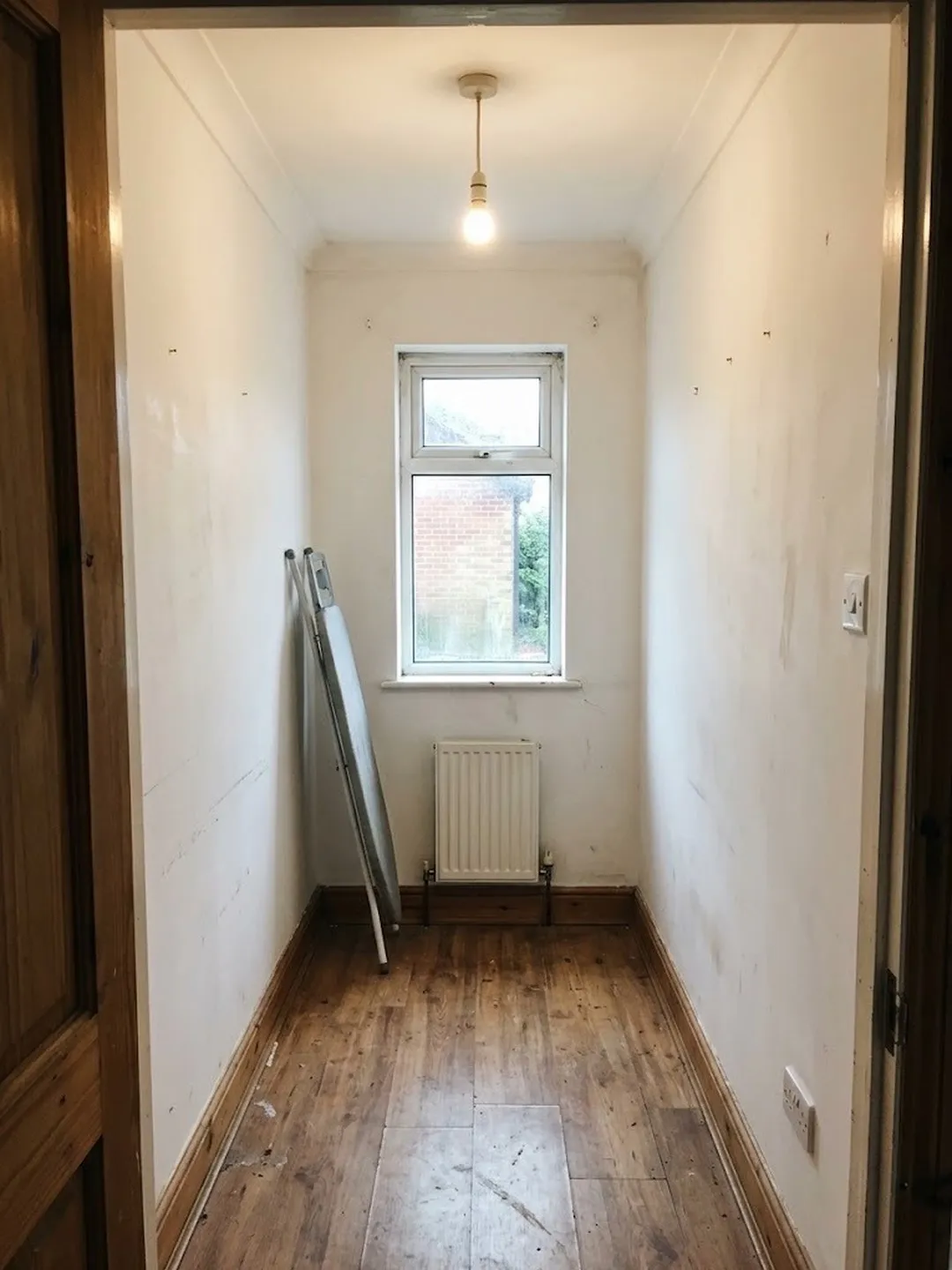
The Scandinavian version follows the small-room rule to the letter. The walls stay pale, the bed and dresser stand on slim legs, and a jute runner leads your eye down to the window. It reads as a guest room you'd happily sleep in.
Mid-Century Modern goes darker with sage walls and walnut, and it still works because the window gives the eye somewhere to land. The Cozy Lounge Nook drops the bed for a velvet chaise and turns the room into a place to read. Same photo, three different answers to "what is this room for?". You can browse every style on the Room Redo style wall.
How to turn an AI redesign into real changes
Treat the redesign as a mood board made from your own room. Take the colors, the materials and the one big move. Leave the exact pieces and their positions.
Here's a cluttered bedroom with a loud tropical wallpaper wall, redesigned with Room Redo. Use it to practice each step below.
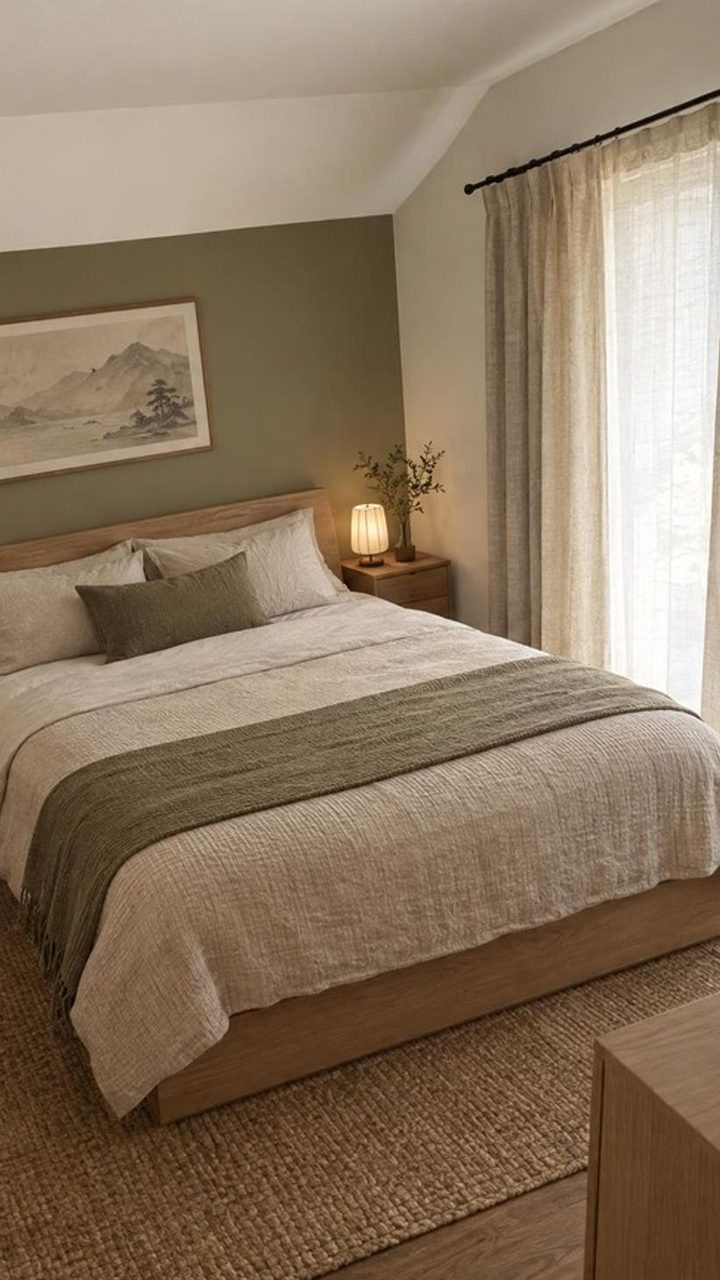
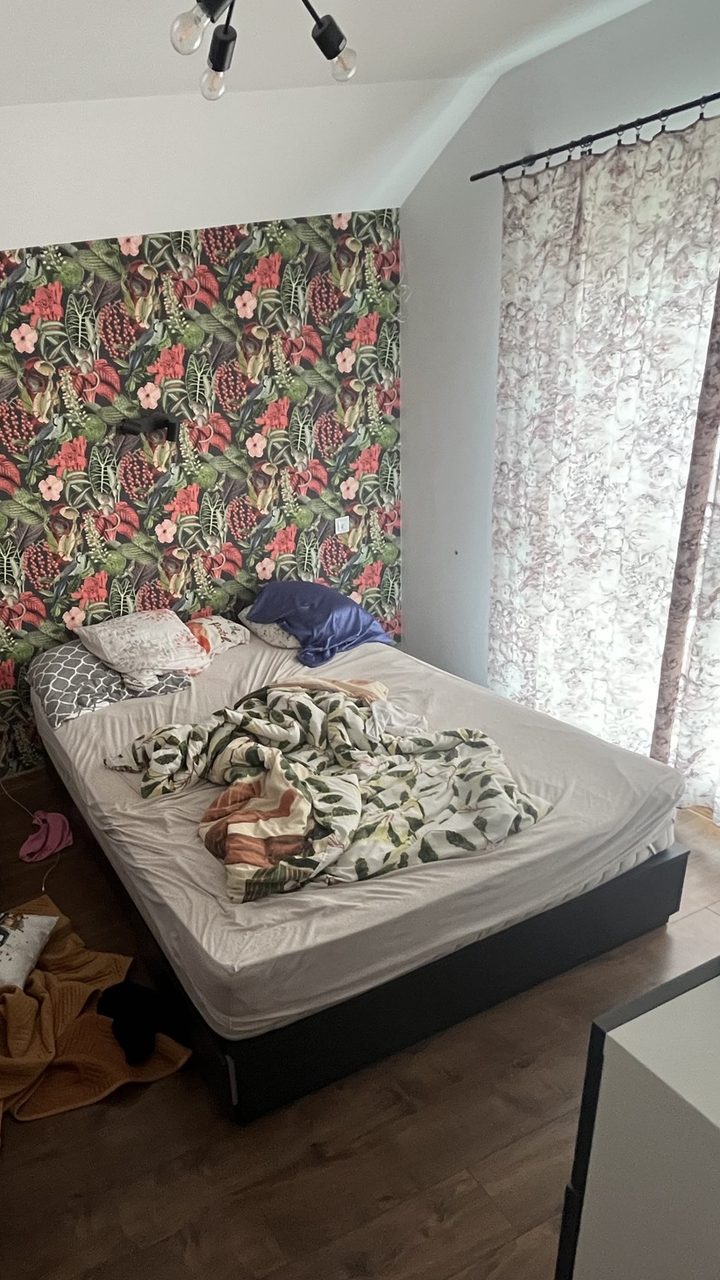
Pull the palette. Name three colors from the picture: one for the walls and other big surfaces, one for the larger furniture and the rug, and one small accent. That's the decorators' 60-30-10 split, which Livingetc describes as 60 percent one color, 30 percent a second on pieces like chairs, rugs and sofas, and 10 percent a third in art and accessories. In the bedroom, that's warm white and oat linen, then pale oak and jute, then sage on the accent wall, the throw and one cushion.
Find the one big move. Most redesigns hinge on a single change. Here it's the wall: swap the wallpaper for flat sage paint and the room already looks different with your old bed in it.
Choose the rug early. Designer Jenny Komenda starts there because "it's so easy to tweak the other choices in the room to fit the rug," she told House & Garden. Choosing it first doesn't mean laying it first, though.
Do the work in this order, so nothing gets painted around or splashed:
| Order | What | In this bedroom |
|---|---|---|
| 1 | Walls | Strip the wallpaper, paint the wall sage |
| 2 | Big furniture | A low bed in pale wood |
| 3 | Rug (chosen first, laid third) | A chunky jute rug under the bed |
| 4 | Textiles | Oat linen bedding, a sage throw, sheer curtains |
| 5 | Lighting | A small lamp on the nightstand |
| 6 | Decor | One large framed landscape print |
Copy the material, not the object. The pieces in a redesign are there to show the idea, so shop for "pale oak bed frame" or "chunky jute rug" instead of hunting for that exact one. Then measure your room before you buy, because a picture isn't to scale.
Take the layout from your tape measure. Furniture can move between looks. In the spare room above, the bed sits on the left in Scandinavian and on the right in Mid-Century Modern. Put things where your doors, sockets and radiator allow.
How AI room design works in Room Redo
The whole thing happens on your iPhone, in four steps.
- Take a photo of your room.Use the camera or pick one from your library. A single corner works too.
- Pick a style.Choose from more than 45: 20 Serious styles and over 25 Wild ideas.
- Watch it come together.The app shows the redesign developing as it happens.
- Compare and try more.Drag between before and after, then try another style on the same room.
Every room you redesign is kept in "My spaces", so you can come back to the spare room next week and try Japandi on it.
Is this AI room design free, really?
Yes. Your first redesign is free, one per device, and it's the full redesign in any style, Wild ideas included.
That makes it a fair test. Use the room you actually want to change, shoot it the way the table above describes, and pick the style the second table points you to. After that free redesign, you can buy a plan or a one-time pack.
- First redesign1 per device, with a small watermarkFree
PlansRenews until you cancel
- Weekly plan15 redesigns each week$9.99per week
- Monthly plan50 redesigns each month$19.99per month
PacksPay once
- Pack of 1010 redesigns$4.99one time
- Pack of 2020 redesigns$9.99one time
US App Store prices. Plans renew automatically until you cancel. Cancel any time in iPhone Settings, under Subscriptions.
Every plan and pack works on rooms and corners, in all styles. A pack suits one room you've already decided on. A plan suits working through a whole home.
Most homes have one room whose door stays shut when guests come over. Stand in that doorway tomorrow morning, phone level at chest height, and see what it could be.
